For a long time, the phrase “gaming setup” was synonymous with a massive, immobile desktop tower anchored to a desk by a dozen different cables. However, as we move through 2026, the paradigm has shifted. Advancements in silicon efficiency, thermal management, and external connectivity have allowed the humble laptop to evolve into the heart of a high-performance command center.
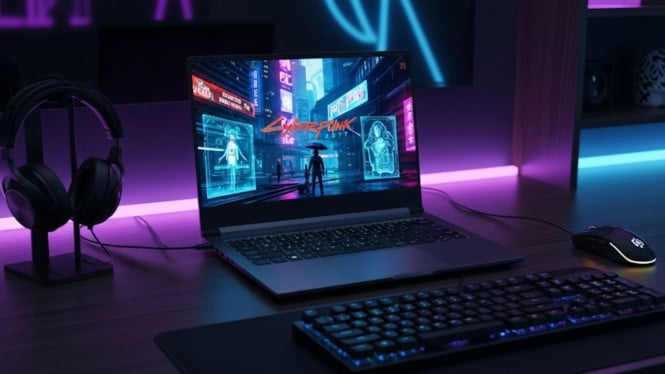
The “dream setup” is no longer about raw size; it is about the seamless integration of power, aesthetics, and portability. It is a space that allows you to crush AAA titles at maximum settings by night and transition into a streamlined productivity hub by day. This article breaks down the essential components and design philosophies required to build a laptop gaming station that transcends the ordinary.
The Heart of the Beast: Selecting the Anchor Laptop
The foundation of this setup is, naturally, the laptop itself. In our dream scenario, we are looking for a machine that balances performance with thermal intelligence. While “thin and light” is impressive for travel, the dream stationary setup benefits from a “desktop replacement” class machine.
We are looking for a device equipped with the latest generation mobile GPUs, featuring at least 16GB of VRAM and AI-driven frame generation capabilities. But the real secret to a dream laptop is the I/O (Input/Output). A dream setup requires a laptop with at least two Thunderbolt 5 or USB4 Version 2.0 ports. This allows for a single-cable connection that can handle high-speed data, 8K video output, and power delivery simultaneously, eliminating the “cable nest” that plagues many inferior setups.
Visual Immersion: The Ultra-Wide Expansion
While modern laptop screens—especially those featuring Mini-LED or OLED technology—are stunning, the dream setup demands more screen real estate. The centerpiece of our visual experience is a 34-inch or 38-inch QD-OLED ultra-wide monitor.
By using a dedicated monitor arm to hoist the ultra-wide display, we create a “floating” effect that leaves the desk surface clear. In this dream configuration, the laptop isn’t just sitting closed on the side; it is perched on a ventilated vertical stand or a secondary cooling tray. This dual-screen arrangement allows the laptop’s own high-refresh-rate screen to act as a secondary display for Discord, system telemetry, or Twitch chat, while the primary ultra-wide monitor provides the cinematic immersion for the game itself.
The Ecosystem: Connectivity and Cable Management
The true mark of a professional-grade setup is the “single-cable” philosophy. To achieve this, a high-end Thunderbolt docking station is non-negotiable. This dock acts as the brain of the desk, housing all your peripherals—mechanical keyboard, high-precision mouse, audio interface, and external storage—while connecting to the laptop through one discreet cable.
Cable management is where a setup moves from “good” to “dream-like.” Using under-desk trays, magnetic cable channels, and braided sleeves ensures that not a single wire is visible to the eye. This creates a minimalist aesthetic that reduces mental clutter and allows you to focus entirely on the game. In 2026, we also prioritize wireless freedom, utilizing “polling rate” optimized wireless peripherals that offer latency-free performance equal to their wired ancestors.
Sensory Satisfaction: Audio and Tactile Feedback
A dream setup must appeal to more than just the eyes. Audio is often the most overlooked component. Instead of relying on tinny laptop speakers, our dream station features a pair of high-fidelity active studio monitors positioned at ear level using dampened stands. For late-night sessions, a dedicated DAC (Digital-to-Analog Converter) paired with open-back planar magnetic headphones provides a soundstage so wide you can hear the rustle of leaves behind you in an open-world RPG.
Then, there is the touch. A custom-built 75% mechanical keyboard with gasket mounting and hand-lubed switches provides a typing and gaming experience that is as much about the “thocky” sound as it is about the tactile response. Beneath it all lies a desk-length premium mousepad, perhaps with a subtle micro-texture optimized for optical sensors, ensuring that every flick-shot is pixel-perfect.
Atmosphere and Ergonomics: The Final Touches
The environment around the setup is what gives it soul. We move away from the “RGB puke” of yesteryear in favor of sophisticated bias lighting. Smart LED strips placed behind the monitor and under the desk provide a soft, diffused glow that syncs with the colors on the screen, expanding the visual experience beyond the bezel.
Ergonomics remain the silent hero. A motorized sit-stand desk allows for flexibility during long sessions, while a high-end ergonomic task chair ensures that your posture remains supported. In our dream setup, every element—from the height of the monitor to the tension in the microphone boom arm—is tuned specifically to the user’s body.
Conclusion: A Personal Digital Sanctuary
The Laptop Gaming Setup of Our Dreams is a testament to how far mobile technology has come. It is no longer a compromise; it is a choice. By combining the portability of a high-end laptop with the curated environment of a professional workstation, we create a space that is versatile, powerful, and deeply personal.
This setup is more than just a collection of expensive parts. It is a sanctuary designed for focus, relaxation, and the pursuit of digital mastery. It proves that with the right planning and a focus on cable management, ergonomics, and high-quality peripherals, the laptop can indeed be the king of the gaming world.
Would you like me to create a specific parts list for a budget-friendly version of this dream setup?